Photoshop Costs $22.99 a Month. Picstea Does Layers, Masks and PSDs for Free.
Picstea is a new free photo editor that runs in the browser, with layers, masks, smart objects and PSD files. It needs no account and never uploads your images.
On this page
Picstea's features and policies below come from its own website as of October 19, 2026. The privacy check was done by WikiDigit the same day.
Picstea is a new photo editor that runs entirely in your web browser and costs nothing. It has layers, masks, adjustment layers, smart objects, the Pen tool and recorded actions, and it opens and saves layered Photoshop (PSD) files. There is no account, no watermark and no limit on exports, and the company says your images are never uploaded. Adobe charges US$22.99 a month for Photoshop on an annual plan. Picstea's pitch is that for everyday photo editing, retouching and layered design, it is often all you need. The domain was registered on October 18, 2026, so this is a product in its first days.
What Picstea Actually Does
Open picstea.com and you land in the editor. There is no landing page or sign-up wall in front of it. The layout will feel familiar to anyone who has used Photoshop: a menu bar with File, Edit, Image, Layer, Adjustments, Filter and Select, a tool strip on the left and panels on the right.
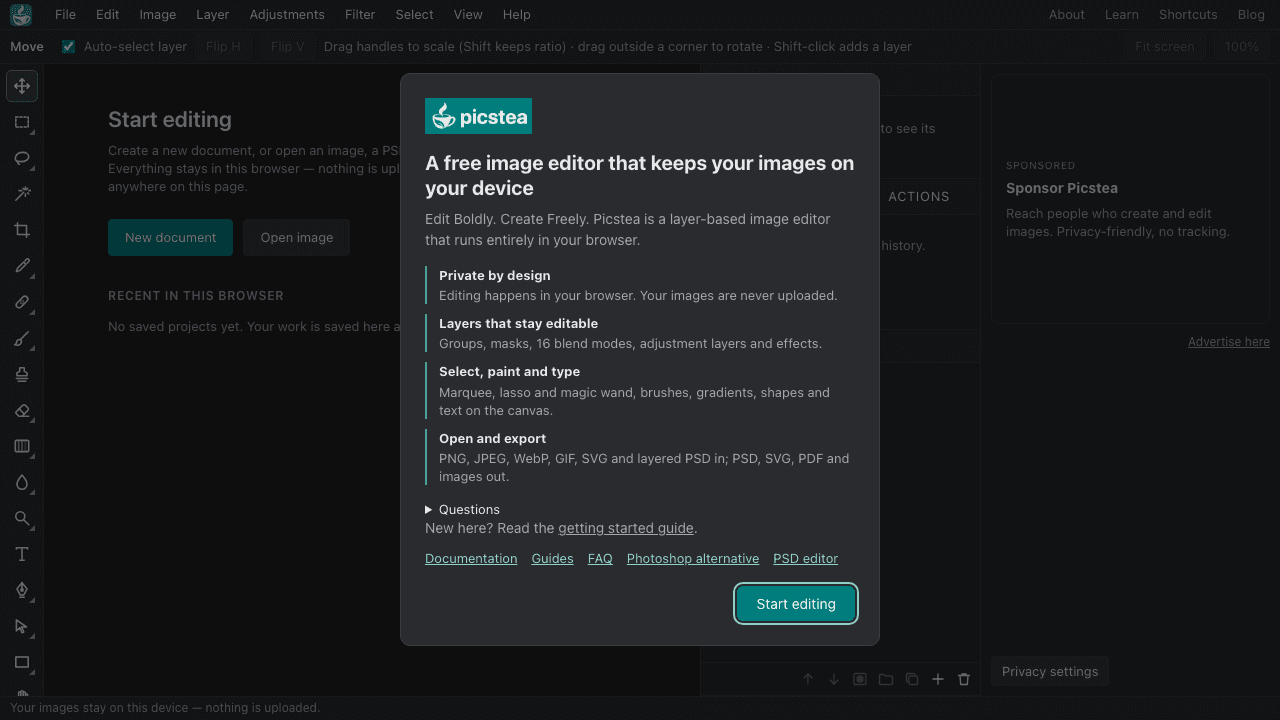 Picstea's editor on October 19, 2026. Screenshot: WikiDigit.
According to its documentation, the editor covers:
- Layers: pixel, shape, text, fill and adjustment layers, plus groups, 16 blend modes, masks and layer effects.
- Selections: marquee, lasso, magic wand and Color Range.
- Painting and retouching: brushes, gradients, Clone Stamp and Healing Brush, plus brushes that lighten, darken, saturate, blur, sharpen and smudge.
- Vector work: the Pen tool with editable paths, which can be turned into selections or vector masks.
- Smart objects: layers that scale without losing quality, with editable smart filters.
- Automation: recorded actions that can be replayed on one image or a whole batch.
Keyboard shortcuts follow Photoshop's conventions, such as V for Move and Ctrl/Cmd+J to duplicate a layer, so muscle memory carries over.
PSD Files Open With Their Layers Intact
For many people, PSD support decides whether a Photoshop alternative is any use at all. Picstea's PSD editor page says it opens 8-bit RGB and greyscale PSDs up to 12,000 pixels per side. Text stays editable, and Levels, Curves, Hue/Saturation and other adjustment layers come through. So do shape and fill layers, embedded smart objects, and common layer styles such as drop shadow, stroke and bevel.
The limits are spelled out on the same page. Picstea can't open PSB (large document) files, 16- or 32-bit colour, or CMYK. Warped text, Photoshop's own smart filters and a few styles such as satin and inner glow don't carry over. When you save back to PSD, text, shapes, smart objects and styles keep their look but become pixels. Exports go to PSD, PNG, JPEG, WebP, SVG and PDF.
Your Images Stay on Your Machine
Most free online editors process your file on a server. That is the same trade-off WikiDigit looked at when Emojar rebuilt itself around browser-only tools. Picstea says it does the opposite: images are "opened, edited, saved and exported in your browser," and projects live in the browser's storage on your device.
We checked what we could. When WikiDigit loaded the editor on October 19, every network request went to Picstea's own domain and no cookies were set. The site also sends a Content-Security-Policy header with connect-src 'self', which tells the browser to block connections to any other server. That doesn't prove what happens on Picstea's own servers, but it rules out the common pattern of quietly shipping files to a third-party API. When a single login can expose millions of people's records, not holding the files at all is the simplest protection there is.
How It Compares With Photoshop and Photopea
Picstea is unusually frank about where it falls short. Its Photoshop alternative page describes its depth as "core editing and retouching" and Photoshop's as "far more features, including AI tools." It says Photoshop is still the right tool for CMYK print production, 16- and 32-bit or RAW images, AI generation, and 3D or video. Picstea's FAQ confirms there is no generative fill, object selection or content-aware fill yet. It is also built for a mouse and keyboard, so it isn't really a phone editor.
What you get instead is the price and the setup. Adobe lists the Photoshop plan at US$22.99 a month on an annual commitment (US$263.88 prepaid), and the app has to be installed. Picstea works in current Chrome, Edge, Firefox and Safari.
The closest rival is Photopea, the long-running free browser editor that also opens PSDs. Photopea shows ads inside the editor and sells a Premium account to remove them. Picstea says it is funded by ads "on the website and blog, never inside the editor." The editor screen we loaded does reserve a sidebar slot labelled "Sponsored," which currently advertises Picstea's own ad space.
Who Is Behind It
That part is unclear. Picstea's pages don't name a company or a founder, and the footer only says "© Picstea." Its blog already has 11 how-to guides, on layers and masks, Levels and Curves, the Pen tool, smart objects and batch actions, but no launch post or dates. Until the people behind it step forward, judge it on what you can test yourself: open a PSD, try the tools you use every week, and see whether you miss the subscription.
Sources
- Picstea: the editor and welcome panel
- Picstea: Photoshop alternative: comparison table and stated limits
- Picstea: PSD editor: PSD support and what isn't preserved
- Picstea: FAQ: pricing, privacy, formats, AI and mobile
- Adobe: Photoshop plans: US pricing
- Photopea: Premium accounts: ad-free Premium
Frequently asked questions
What is Picstea?
Picstea is a free, layer-based image editor that runs in a web browser at picstea.com. It has layers, masks, adjustment layers, selections, brushes, retouching tools, the Pen tool, smart objects and recorded actions, and it opens and exports layered PSD files. It needs no account or installation.
Is Picstea really free?
Yes. Picstea says it is free with no account, no watermark and no limit on exports, and that it is funded by advertising on its website and blog rather than by subscriptions. There is no paid tier listed.
Does Picstea upload my images?
According to Picstea, no: images are opened, edited, saved and exported in the browser, and projects are kept in the browser's storage on your device. When WikiDigit loaded the editor, the site's security policy only allowed network connections back to Picstea's own domain, and no requests went to other servers.
Can Picstea replace Photoshop?
For everyday photo editing, retouching and layered design, often yes. Picstea itself says Photoshop is still the right tool for CMYK print work, 16- and 32-bit or RAW images, AI generation such as generative fill, and 3D or video. Its PSD support covers 8-bit RGB and greyscale files.
More to Read
Benchmark Says AI Is Breaking VC's No-Rivals Rule. The Factory Feud Shows Why.
Benchmark's partners admit AI is eroding VC's rule against backing rivals. Khosla Ventures backs both Factory and Cognition, and that feud already went public.
Ramp Is Now Worth $60 Billion. Its Closest Rival Sold for $5 Billion.
Ramp reportedly raised $1.85B at a $60B valuation, up from $44B in June. Its old rival Brex sold to Capital One for $5.15B. Same market, roughly a 12x gap.
Emojar Was an Emoji Site. Now It's 264 Free Tools That Never Upload Your Files.
Emojar, the Berlin-built emoji copy-paste site, pivoted in October 2026 to 264 free online tools that run in your browser. Your files never touch its servers.